MAKE IT PERSONAL
Printable place card maker
Welcome your guests with matching name cards. Add the names, choose a style and fold along the guides.
Free · No account needed · Saved on your device
Your preview
Preparing preview…
PDF pages contain rendered images. Print at Actual size / 100% on matching paper. Up to 40 pages per export.
PNG downloads the displayed sheet at the selected resolution.
1200 ppi is the default for crisp lettering and fine lines. Choose a lower resolution for smaller files. Photo detail depends on the original image.
Did this tool help you?
From preview to finished project
- Add your content and choose a layout. Review every page, especially long names and captions.
- Download the PDF and select the matching paper size. Print one test page at 100% before printing the set.
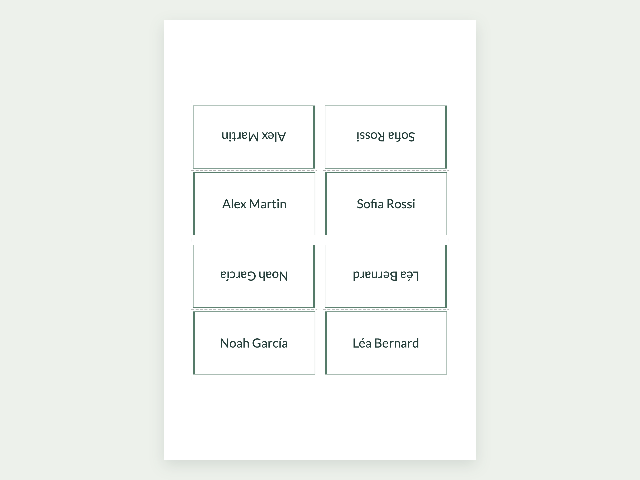
- Cut around each card. For tent cards, fold along the dashed center line so both names face outward.
Features, sizes and downloads
What can I customize, and what are the limits?
Create up to 240 name cards, including repeated copies, with optional individual table numbers or details. Set face width from 25–190 mm and height from 15–140 mm. Flat cards use one face; folded tent cards use twice its height and include fold guides.
Wedding designs
The same design is available for invitations, guest cards, menus, programs and table cards.
- Italian estate · Libre Caslon Display + Lato
- Citrus grove · Marcellus + Lato
- Burgundy editorial · Gloock + Barlow
- Classic ivory · DM Serif Display + Lato
- Garden green · Prata + Amiko
- Modern rose · Barlow + Lato
- Olive grove · Cormorant Upright + Lato
- Wildflower meadow · Allura + Lato
- Modern arch · Italiana + Barlow
- Deco champagne · Cinzel Decorative + Lato
- Something blue · Cormorant SC + Amiko
- Terracotta sunset · DM Serif Text + Lato
- Pearl romance · Pinyon Script + Lato
- Midnight stars · Prata + Lato
- Silk ribbon · Parisienne + Lato
Which sizes and file formats can I download?
Available paper sizes are A3 (297 × 420 mm), A4 (210 × 297 mm), A5 (148 × 210 mm), A6 (105 × 148 mm), US Letter (8.5 × 11 in), Legal (8.5 × 14 in) and Tabloid (11 × 17 in), with portrait or landscape orientation.
Export PDF pages or the displayed sheet as PNG at 150, 300, 600 or 1200 ppi. PDFs contain rendered images and preserve physical page dimensions. Layouts support up to 40 pages; item size, margins and two-sided layouts determine how many entries fit. Print at Actual size / 100%.
Example made with this tool
Questions about your printable
Can each guest have a different table number or detail?
Paste names in the first column and table numbers or other details in an optional second column, without headings. Each card keeps its own detail. Names stay in your list order, including duplicates.
How do I print and fold tent place cards?
Enable Folded tent cards and set the finished face dimensions. Each unfolded card uses twice the face height. Print at 100% on matching paper, cut around the card and fold on the center guide so both names face outward.