Colors & palettes
Make every word easier to read
Try your text against a background, check the contrast and find a combination that works.
Free · No account needed · Saved on your device
Your result
Only on this deviceKeep creating
Use this result as the starting point for a design.
Did this tool help you?
Features and uses
The color contrast checker compares foreground and background colors against WCAG AA and AAA thresholds for normal and large text. Color pickers and HEX, RGB or HSL inputs support quick adjustments.
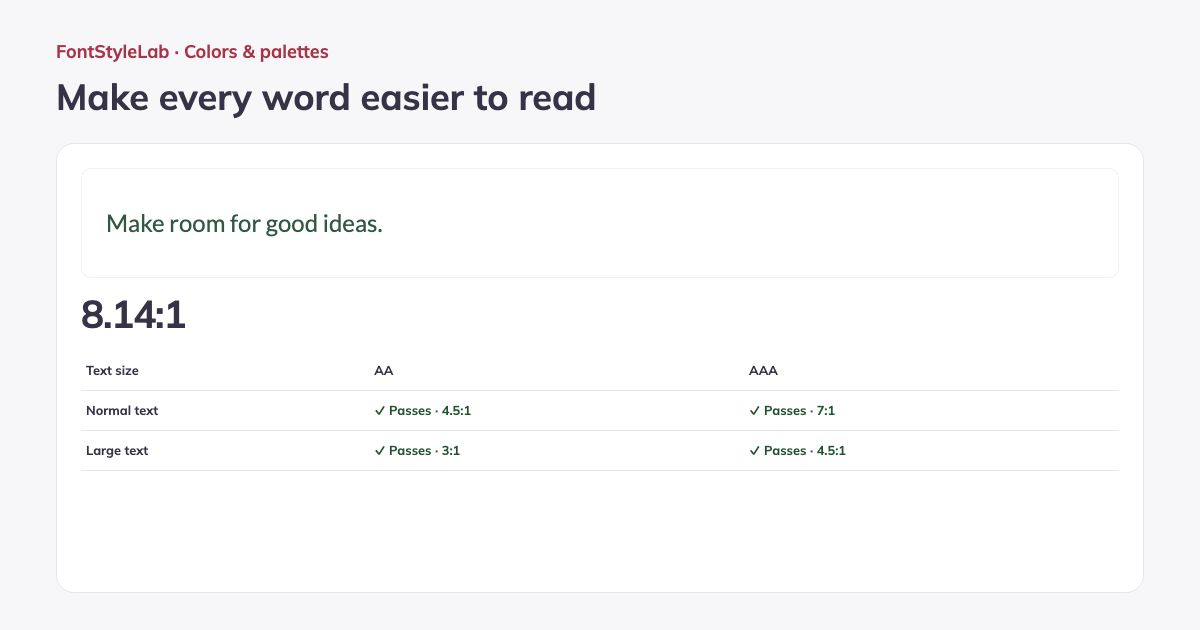
Try your own text, choose a font, size and weight, and account for transparent colors over a page color. Swap colors, find an AA foreground, copy the CSS or download a PNG report with the text preview and results.
Formats, options and limits
Color fields accept 3-, 4-, 6- or 8-digit HEX with or without the # sign, RGB/RGBA and HSL/HSLA notation. Alpha values control transparency. Use the visual picker for quick changes or type a value for precise control.
- Preview up to 300 input characters in a font from the site library, at 12–96 px with regular or bold weight. Transparent text and backgrounds are evaluated over your chosen opaque page color. The AA color suggestion targets at least 4.5:1 for normal text.
- Copy CSS containing the text color, background color and contrast ratio. The downloadable PNG report is 1200 px wide, with height adjusted to fit the text, and includes the preview, AA/AAA results, font settings and color values. Use it to document a chosen color pair.
Work without an account: text and photos are processed in your browser. Save a project on this device or download a backup to reopen it later.
Good to know
WCAG AA requires 4.5:1 for normal text and 3:1 for large text. AAA requires 7:1 and 4.5:1 respectively. Large text starts at 24 px, or about 18.67 px when bold. Results use the unrounded ratio.
Transparent colors are composited over the page color. A passing ratio checks the chosen colors, not the accessibility of an entire design. Read the WCAG contrast guidance
Example made with this tool