MAKE IT PERSONAL
Free printable bingo card maker
Bring your words and pictures to game night or the classroom. Make a different card for every player, with caller sheets ready to go.
Free · No account needed · Saved on your device
Your preview
Preparing preview…
PDF pages contain rendered images. Print at Actual size / 100% on matching paper. Up to 40 pages per export.
PNG downloads the displayed sheet at the selected resolution.
1200 ppi is the default for crisp lettering and fine lines. Choose a lower resolution for smaller files. Photo detail depends on the original image.
Did this tool help you?
From preview to finished project
Print the cards, cut if needed and keep the caller sheets. Call each word or picture once and mark it off. Choose a winning pattern before the game starts.
- Add your content and choose a layout. Review every page, especially long names and captions.
- Download the PDF and select the matching paper size. Print one test page at 100% before printing the set.
- Save a project or download a backup to reuse the design. Clearing browser storage removes local projects.
A guide to your activity
What you can make and how to use it
Make custom bingo cards with words or pictures for vocabulary lessons, revision or a classroom game. Alongside printable cards and caller sheets, the bingo card maker includes an on-screen caller and digital cards. Separate calling prompts from card answers to practise definitions or translations.
How to get started
- Enter your card answers and optional calling prompts. Choose a grid size and the number of cards, then review the preview.
- Download cards and caller sheets for a paper game, or open the caller and a digital card to play on screen.
- Agree on a winning pattern before playing. Call an item, let players mark the matching answer, and check a claimed win against the called items.
Common questions
Do digital bingo cards synchronize between devices?
No. Each device keeps its own activity. A host calls the prompts aloud or on a shared screen; players mark their own cards. An activity link is a copy of the material, not a synchronized multiplayer room.
Can I save my activity for another lesson?
Yes. Save a project in this browser or download a project backup to open later. A backup is useful when moving devices or clearing browser storage. Shared links are independent copies; later changes and results do not sync.
Features, sizes and downloads
What can I customize, and what are the limits?
Choose 3 × 3, 4 × 4 or 5 × 5 grids and generate up to 120 unique arrangements, with one, two or four cards per sheet. Add words or pictures, an optional free center on odd grids and caller sheets. Keep the arrangement code to reproduce a set.
Which sizes and file formats can I download?
Available paper sizes are A3 (297 × 420 mm), A4 (210 × 297 mm), A5 (148 × 210 mm), A6 (105 × 148 mm), US Letter (8.5 × 11 in), Legal (8.5 × 14 in) and Tabloid (11 × 17 in), with portrait or landscape orientation.
Export PDF pages or the displayed sheet as PNG at 150, 300, 600 or 1200 ppi. PDFs contain rendered images and preserve physical page dimensions. Layouts support up to 40 pages; item size, margins and two-sided layouts determine how many entries fit. Print at Actual size / 100%.
Photo fields accept JPEG, PNG or WebP up to 12 MB each. Combined project images must stay within 24 MB and 40 million source pixels. Your photos and saved projects stay in the browser.
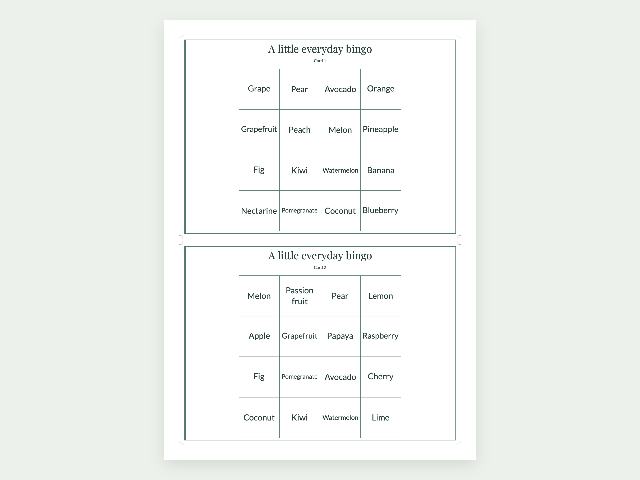
Example made with this tool
Questions about your printable
How many different bingo cards can I print?
Create up to 120 unique arrangements from the same word or picture list. Choose one, two or four cards per sheet. Each export can contain up to 40 pages, including caller sheets.
What is included in the caller sheets?
Caller sheets contain every item in your list, even when an individual card uses only some of them. Use PDF pages to download the playing cards, caller sheets or both.